Posts
Comments

MachinistBlog.com

Plans, projects and how-to's for home machinists

How to Read a Micrometer

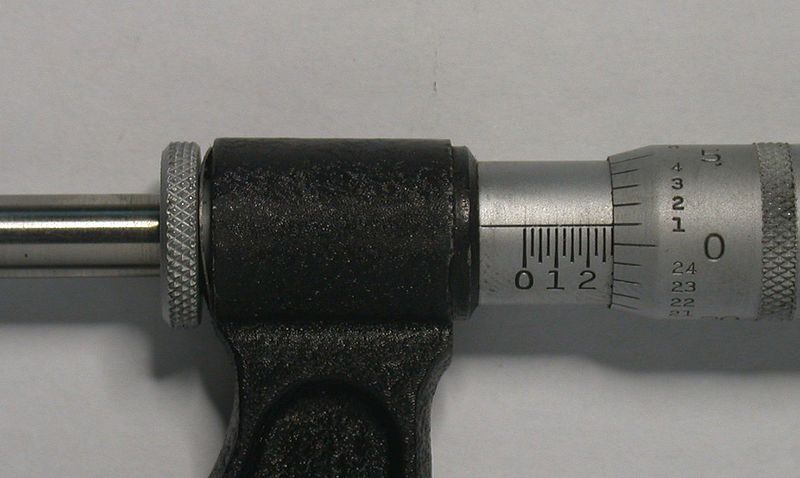
Inch-micrometerI want to tell you about two excellent tutorials that will teach you how to read a micrometer and give you some practice so you can be sure you are doing it right.  This is still an important skill even though it seems like everything has a digital readout nowadays.  Although it may seem like an inexpensive 6-inch digital caliper can be used to measure almost everything, especially in a home machine shop, a micrometer is often going to be more accurate and be the best or only tool for the job.

Digital micrometers are significantly more expensive than digital calipers.  There are also different kinds of mics for different purposes and they all have a limited measuring range.  So you may need or want to acquire an assortment of mics.  That could get pretty expensive if you buy them all with digital readouts, which is probably why there are still lots of micrometers being sold that require you to read the measurement off the barrel and thimble.

There are standard and vernier micrometers.  A standard micrometer measures in thousandths (.001) and vernier caliper measures in ten-thousandths (.0001).  You can recognize a vernier caliper by the extra lines located on the barrel.  This first web site clearly shows the difference and teaches you how to read both kinds.  Toward the bottom of the article you’ll find a flashing link that will let you practice reading a simulated micrometer.

This second web site uses a Java applet to display a standard metric outside micrometer.  You can use your mouse or your keyboard’s arrow keys to adjust the jaws and compare your reading to the correct answer.

I would also like to suggest Wikipedia’s article about micrometers if you would like to learn more about mics, their parts and how they operate.

My brother, a tool and die maker who retired when he got fed-up with the company he worked for, gave me a nice assortment of mics made by either Starrett or Brown and Sharpe.  But I started out with a three-piece set that I got on sale from Harbor Freight for about $30.  I checked them the last time I had access to a set of gage blocks and they were all dead-on.  Their fit and finish is very good and they came with a nice storage case.  I recommend them if you’re looking for a basic set of outside micrometers to get started with.  I have not seen them on sale in my local Harbor Freight store in a while, but HF has started publishing 15% and 20%-off any item coupons in Popular Science, Sports Illustrated, Family Handyman, Field & Stream and a few other magazines.

Use Friction Turning to Make Thin Disks and Flywheels on the Lathe

Friction Turning on a Mini-Lathe

Click for more pictures

This article describes how I made two round disks on my lathe out of sheet metal too thin to be held in a lathe chuck.  I also could not use a mandrel because one of the disks was not going to have a hole drilled through its center.  The two disks were made from .073-inch thick aluminum sheet metal and are about 5-inches in diameter.  They are the top and bottom cylinder plates for the Stirling engine I am building.

First, I want to give credit where it is due.   I learned this from “Bogstandard” who described it on the Home Model Engine Machinist Forum and illustrated it with lots of nice pictures.  He calls this method friction turning and uses it to make flywheels out of flat plates for models, which can be sometimes be easier and cheaper to obtain than a chunk of large diameter round stock.

With this method the work piece is held against the jaws of the lathe chuck by a live center in the tailstock.  This allows you to turn down the diameter of the entire length of the work piece.  The jaws are opened so their outside edges are a little less than the finished diameter of the work piece.  Bogstandard recommends that you put an appropriate size piece of round stock in the chuck, presumably so it helps support the middle of your workpiece.  I did not do that for this project and it still worked fine.

Continue reading Use Friction Turning to Make Thin Disks and Flywheels on the Lathe

MIT TechTV Machine Shop Videos

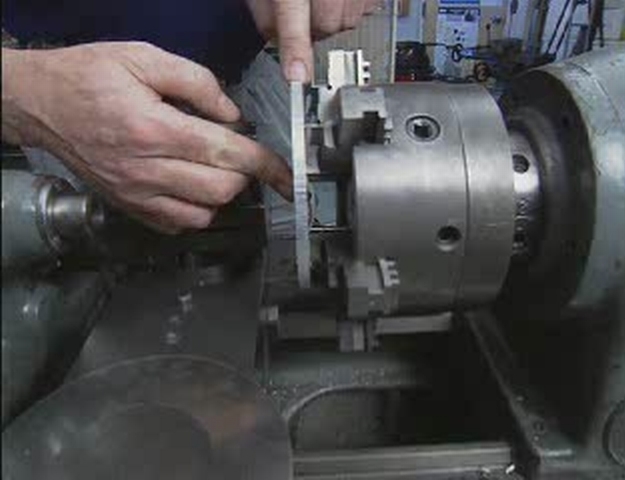
From one of MIT's TechTV Machine Shop VideosHere is a great resource for new machinists that almost seems like a secret because I have never seen it mentioned on any of the discussion groups or forums I belong to.

In 1995 the director of MIT’s machine shop for the Artificial Intelligence Laboratory (Robotics Group) made ten videos, totaling more than seven hours, that teach students how to use machine tools.  They show how to set up and do basic machining operations on a mill, lathe, drill press and other common shop equipment, but they do not include recommendations about cutting speeds or feed rates because students are expected to look up that information on their own.

The instructor generally does an excellent job, but even seven hours is not long enough for all the material he tries to cover and there are some shortcomings.  For example, he could have shown a better technique for setting the height of a lathe bit, and the segment where he covers thread cutting on a lathe is almost useless.  Yet I was surprised to find that he also includes, and does a good job, showing some more advanced techniques, like using double-side tape to hold parts too thin to be held in a milling vise or lathe chuck.

You can watch the videos online or save them to your computer in either WMV (Windows) or FLV format.  [Note: The WMV files download as AVI files.  Windows will complain about it but it will play them.  You might want to rename them with the .wmv extension.  I also suggest watching them at a video size of 200% if you are using Window's Media Player.]

I have added the times when many of the segments start but I have not had a chance to do that for all of the videos yet.

Machine Shop 1 – Machining Skills for Prototype Development (Length: 40:32)

  • Basic tour of the machine shop
  • Layout techniques (including transferring hole locations)
  • Basic tools: drill press, band saw, belt sander and grinder
  • Locating and drilling holes (includes using a center finder and deburring)
  • Tapping holes (including using a tap guide)

Machine Shop 2 – Machining Skills for Prototype Development (57:33)

  • Drilling holes
  • Special drills for plastics and hard or abrasive materials
  • Drill press limitations
  • Bandsaw
  • Suitable speeds, feeds and materials
  • Bandsaw setup
  • Using the drill press vise

Machine Shop 3 – Machining Skills for Prototype Development (30:02)

  • Good practice – clean up
  • Small belt sander configurations
  • Grinder operations and materials
  • Deburring and buffing
  • Finishing techniques

Machine Shop 4 – Milling Machine 1 (50:33)

  • Parts and controls of a Bridgeport Mill
  • Quill feed
  • Axis handfeeds (11:20) backlash explanation (12:15)
  • Gib locks (14:40)
  • Power feed (18:33)
  • Digital readouts (21:07)
  • Milling machine set-up – squaring/tramming  the head square (22:37)
  • Squaring the vise – adjusting the vise so the stationary jaw is parallel to the bed (32:33)
  • Milling machine accessories and workholding techniques  (41:15)

Machine Shop 5 – Milling Machine 2 (1:03:33)

  • Square and hex collet blocks – used to hold/clamp parts to machine features on 4 and 6 sides of a part respectively (1:02)
  • V-blocks  (2:10)
  • Hold-down clamps – used to hold large or irregularly shaped parts (3:40)
  • Using angle blocks – used to hold materials to machine features not perpendicular on a part (6:15)
  • Drill press vise – using a vise within a vise (8:29)
  • Lathe chuck with vise  – can be used to hold parts in the milling machine (11:11)
  • Double sided tape – can be used to securely hold a part without distortion (12:00)
  • Squaring high aspect ratio parts  (16:02)
  • Right angle attachment (23:04)
  • Slitting saws – used to cut slots/slits/features in a part (33:21)
  • Rotary table – used to machine circular parts, grooves, circles, and segments (41:16).  A dial indicator (43:20) or Coaxial indicator (47:25) can be used to square/center the table to the X & Y axes
  • 5C collet indexer – used to hold collets and to position parts in up to 24 positions  (52:42)

Machine Shop 6 – Milling Machine 3 (42:36)

  • Squaring a part  – machining a piece of metal so all of the surfaces are flat, perpendicular and milled to the nominal size (1:00). Also covers using a fly-cutter (4:50) and deburring (8:40)
  • Squaring a plate (17:52)
  • Using the edgefinder (32:00)
  • Drilling holes with a mill (35:32)

Machine Shop 7 – Milling Machine 4 (23:07)

  • Reaming holes  (1:00)
  • Boring holes with a boring Head (3:04) - also covers using Plug Gages to measure hole sizes (8:54)
  • Milling a slot (10:45)
  • Milling a shoulder, conventional and climb milling (17:11)
  • Cleaning the machine (21:05)

Machine Shop 8 – Lathe 1 (42:37)

  • The Lathe components
  • Turning tools  (6:40)
  • Turning and facing (11:04)
  • Cutting off a part (22:45)
  • Drilling (32:20)

Machine Shop 9 – Lathe 2 (46:15)

  • Tapping
  • Boring (7:31)
  • Knurling with a bump knurler (15:30)
  • Cutting tapers with the vompound (22:21)
  • Turning shafts – using a live center (26:18)
  • Single point thread turning (31:03)

Machine Shop 10 – Lathe 3 (29:00)

  • Lathe chuck
  • Lathe arbors (6:42)
  • Turning between centers (15:40)
  • Face plate irregular shapes (19:00)
  • Face plate thin materials (21:13)